URL: /guides/entity-map
---
title: "The entity map"
sidebarTitle: "Overview"
icon: "map"
description: "Every audit collapses your site's JSON-LD into one graph, so you can see whether your site declares one identity for itself or a new one on every page."
---
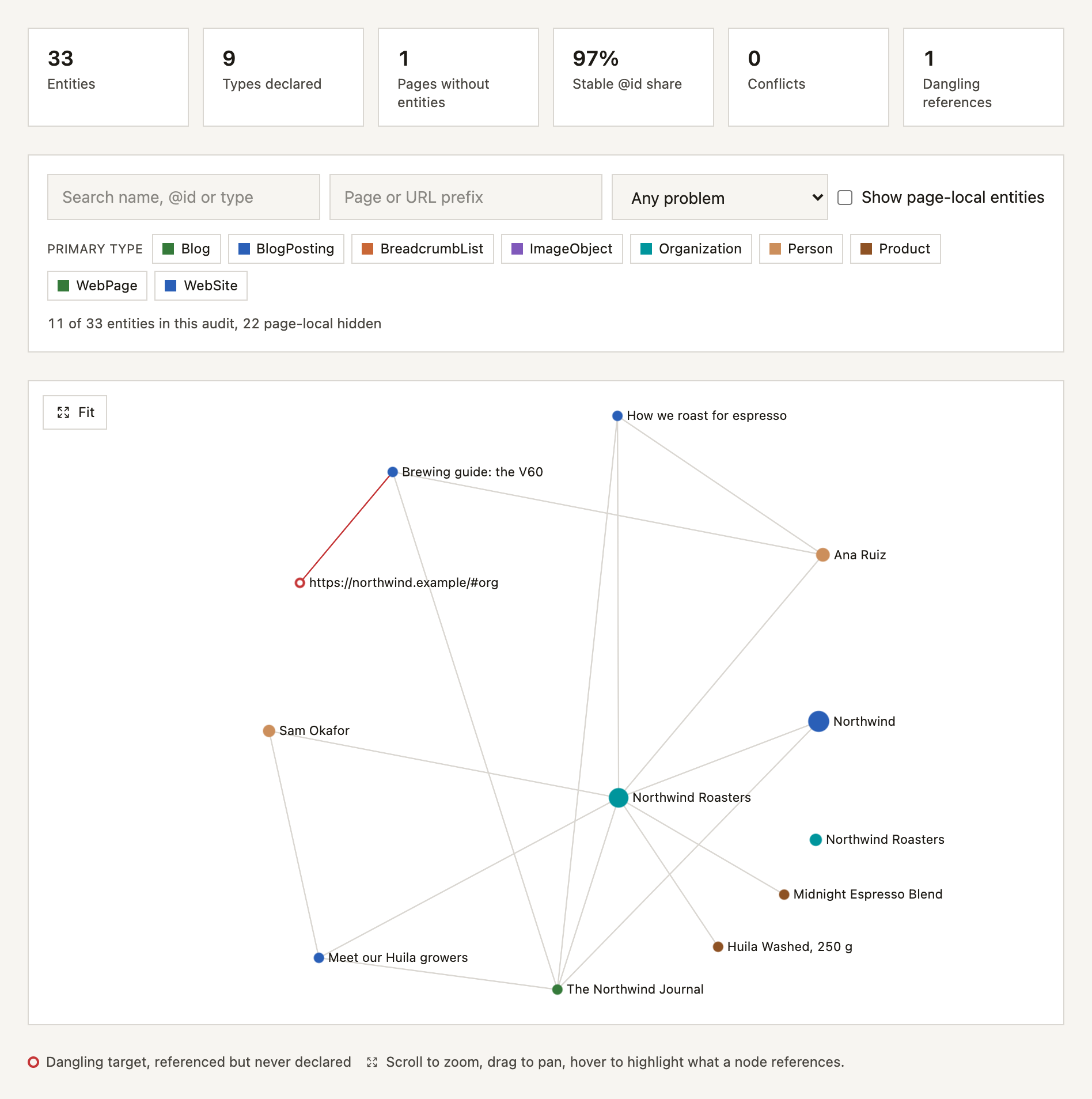
The entity map is the structured data on your whole site, collapsed into one graph. Every squirrelscan audit builds it, on your machine and in the cloud, with nothing to turn on. It answers a question no per-page validator can: does your site declare one organization, one website and one author, or a fresh copy of each on every page?
## Why it matters
Structured data validators check one page at a time. That is the wrong unit for most of what goes wrong with it.
A page can carry a perfectly valid `Organization` block, and so can the fifty-nine other pages, and if none of them says they are the same organization then a search engine has sixty organizations and no reason to connect them. Nothing accumulates: not the reviews, not the profile links, not the authority of the articles.
The entity map makes that visible. It reads the JSON-LD from every crawled page, resolves the references between nodes, and collapses the result into one graph of the entities your site declares rather than a list of the blocks it emits.
## See yours in one command
```bash
squirrel audit https://nutshop.squirrelscan.com
```
The terminal report has an Entities block just above the issues: how many entities the site declares, how many references join them, the share with a stable `@id`, any conflicting or dangling ones, and up to three of the entities declared most often. Page furniture, like each page's own `WebPage` and `BreadcrumbList`, only fills that list when the site declares nothing else.
To dig in, query the stored map without crawling again:
```bash
squirrel entities # the most-declared entities and anything to fix
squirrel entities --problem no-id # entities on several pages with no @id
squirrel entities --diff # what changed since the last audit
squirrel report -f html -o report.html # the interactive graph
```
Every report format carries the map. The HTML report draws it as a graph you can pan, zoom and filter, Markdown gives you tables, and JSON has the complete document under an `entities` key. Hosted audits get the same map on the website's Entities page in the dashboard.
## What it shows
Four questions, none of which a per-page validator can answer:
- **How many things does this site actually declare?** Sixty `Organization` blocks are either one entity or sixty, and the difference is one line of markup.
- **Does anything tie the declarations together?** The share of entities carrying a stable `@id` is the single most useful number in the map.
- **Do the declarations agree?** The same organization with two logos, two phone numbers or two names is a question with no answer.
- **Do the references resolve?** A `publisher` pointing at an `@id` that nothing in the crawl declares is a reference to nothing, and only a view of the whole site can tell that from a reference the home page satisfies.
## The summary metrics
| Metric | What it tells you |
|---|---|
| Entities | Distinct things the site declares, after collapsing duplicates |
| References | Typed edges between them: publisher, author, isPartOf and so on |
| Dangling references | Edges pointing at an `@id` nothing declares |
| Entities with a stable `@id` | The share that can accumulate across pages. The number to watch |
| Pages with no entities | Pages carrying no JSON-LD at all |
A high entity count with a low stable-`@id` share is the classic shape of a site that emits structured data everywhere and gets nothing from it.
The map itself is informational and never changes the health score. What is wrong with it is reported by the rules below.
## The rules
Thirteen site-wide rules read the map and report what is wrong with it, from identity failures down to tidiness. They are listed under [Structured Data](/rules/schema), and every one of them links back to [fixing structured data identity](/guides/entity-map/fixing), which has the change to make in each generator.
## Monitor with squirrelscan, fix with an agent
Identity is not something you fix once. A new template, a plugin update or a block pasted into one page can declare the organization again, and the map drifts back. Every audit rebuilds the map and, by default, `squirrel entities --diff` compares a site's latest two audits that stored at least one entity, while in the cloud [scheduled audits](/cloud/scheduled-audits) feed the [history on the Entities page](/guides/entity-map/cloud#history). The fix is mechanical but spread across templates, which suits a coding agent: the [entity MCP tools](/guides/entity-map/mcp) give it the map, each finding with its fix and the change between two audits, and re-auditing the same pages shows whether the finding cleared.
Here is that loop on a local copy of northwind.example, the site in the map above, served at `http://localhost:4321`. The prompt:
```text
Audit http://localhost:4321 with squirrelscan and fix the organization
that is declared without an @id. Then re-audit and show me the entity diff.
```
The audit reports the pasted block on two pages:
```text
schema/entity-identity Entity Identity (error)
✗ entity-identity: 1 entity is declared on several pages with no @id
→ Northwind Roasters (Organization)
from /contact/
from /wholesale/
```
The fix is one line in that block, on both pages:
```diff
{
"@context": "https://schema.org",
"@type": "Organization",
+ "@id": "https://northwind.example/#organization",
"name": "Northwind Roasters",
```
Then `squirrel audit http://localhost:4321 --refresh` and `squirrel entities --diff`, excerpted:
```markdown
## Removed (1)
| Type | Name | @id | Occurrences |
| --- | --- | --- | ---: |
| Organization | Northwind Roasters | _none_ | 2 |
## Occurrence changes (1)
| Type | Name | Before | After | Change |
| --- | --- | ---: | ---: | ---: |
| Organization | Northwind Roasters | 9 | 11 | +2 |
## Summary changes (3)
| Metric | Before | After | Change |
| --- | ---: | ---: | ---: |
| nodeCount | 33 | 32 | -1 |
| nodesWithoutIdCount | 1 | 0 | -1 |
| stableIdShare | 0.970 | 1 | +0.03 |
```
Both pages that carried the anonymous organization were crawled again, so its removal is real rather than a coverage gap. The identified organization is now declared on 11 pages instead of 9, and `schema/entity-identity` no longer fires. The dangling `#org` publisher is still there: that is the next finding to hand over.
## Where to next
Every finding, with the exact change in Yoast, Rank Math, WordLift, Next.js, Astro and tangly.
Where the map appears in every report format, `squirrel entities`, and the store.
The dashboard Entities page, its filters and exports, and the API.
Five MCP tools, and the loop that proves a fix landed.
The version 1 document, the JSON-LD export and the change set.
## References
- [The entity map on your machine](/guides/entity-map/cli), [in the cloud](/guides/entity-map/cloud), [for agents](/guides/entity-map/mcp), and [its format](/guides/entity-map/format)
- [Introduction to structured data markup, Google Search Central](https://developers.google.com/search/docs/appearance/structured-data/intro-structured-data)
- [JSON-LD 1.1, W3C](https://www.w3.org/TR/json-ld11/)
- [Getting started with schema.org, schema.org](https://schema.org/docs/gs.html)